Your kids' school emails.
Sorted.
HappyParent HQ reads your school emails, extracts the action items, deadlines, and events — and delivers a daily action briefing so nothing falls through the cracks.
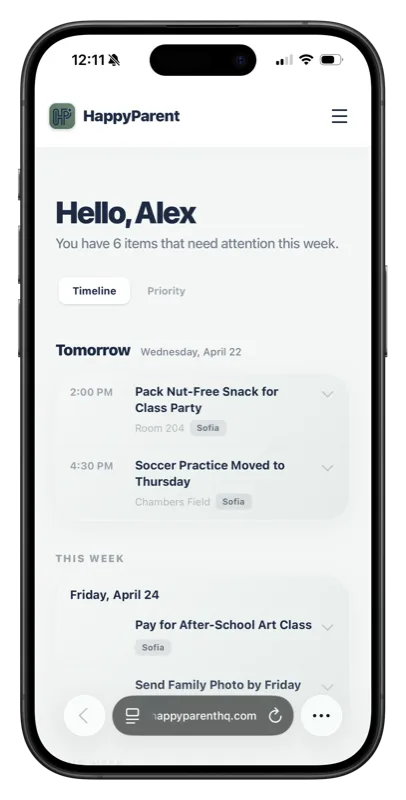
How It Works
Three steps. No more digging through email threads.
Connect Your Email
Sign in with Google and we securely scan your inbox for school-related messages. We only read — never modify, delete, or send. Or skip connecting altogether — every account comes with a private HappyParent forwarding address. Just forward your school emails to it, no inbox access needed.
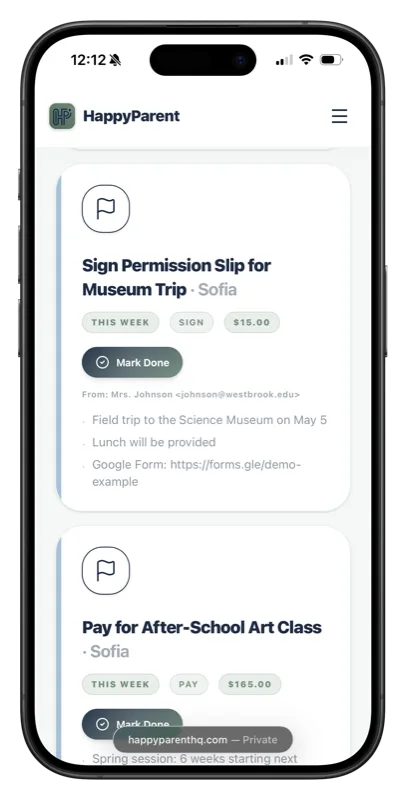
We Extract What Matters
We automatically identify the action items, deadlines, events, and payments buried in newsletters, teacher emails, and team updates.
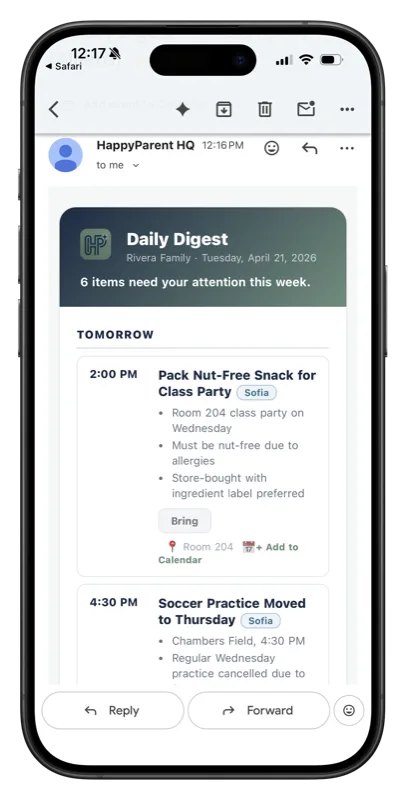
Get Your Daily Briefing
One clean briefing delivered every morning or evening. Mark items done, add events to your calendar, and never miss a permission slip again.
Everything parents need. Nothing they don't.
Built for the chaos of school email.
Daily Action Briefing
Your tasks, schedule, and new emails — delivered as a morning or evening briefing at the time you choose.
Smart Extraction
We read newsletters, permission slips, and coach emails — pulling out dates, deadlines, and dollar amounts.
Calendar Sync
Subscribe to school and sports calendars. Events appear in your briefing alongside email items.
Multi-Child Support
Items automatically tagged to the right kid. Filter your briefing by child.
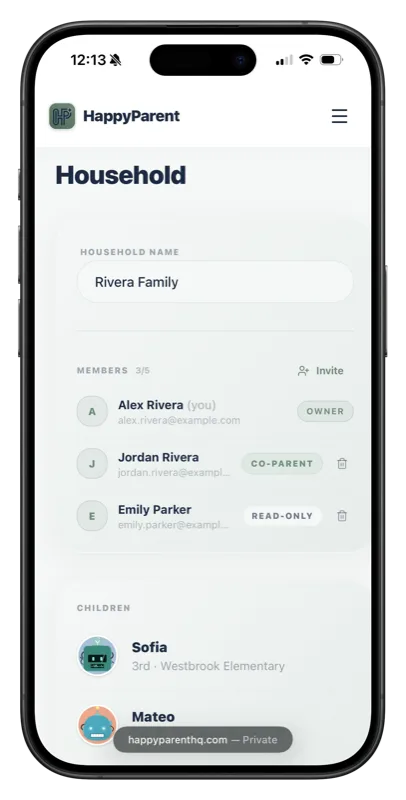
Co-Parent Sharing
Invite your partner, co-parent, or caregiver. Everyone gets the same briefing.
Works With Everything
Gmail, school newsletters, TeamSnap, ParentSquare, Brightwheel, LeagueApps, GameChanger, and more.
Built by a parent. For parents.
"I built HappyParent HQ because I was drowning in school emails. Between my second grader and kindergartener, I was getting 30+ emails a week from teachers, the PTA, coaches, and three different apps — and I still almost missed picture day. This is the tool I wished existed."
What parents are saying
This tool has been a huge help to me as a busy mom of three. The way it streamlines information and helps me cut through the clutter of my inbox is a relief! More than once I've found important sign-ups or reminders in the HappyParent dashboard that I completely missed in my email. Definitely recommend!
Emily
Mom of three · New York
Managing the flood of emails from school, rec sports, and church used to be its own job in our house. HappyParent HQ changed that. The important stuff gets pulled out, it hits the calendar, and nobody's scrambling the morning of. Wish we'd had it sooner!
Nick
Father of two · New Jersey
Frequently Asked Questions
What emails does HappyParent HQ read?
Only emails from school domains, teacher addresses, sports platforms, and senders you approve. Personal and work emails are automatically filtered out by our multi-layer relevance system.
Is my email data safe?
Yes. We use Google's OAuth with read-only access — your password is never shared with us. All data is encrypted with AES-256, and we never sell your data or share your email content. Read our Privacy Policy for full details.
Does it work with Outlook or Yahoo?
Yes. You can connect Gmail, Outlook, or Apple Mail directly, and Yahoo or any other provider through a standard IMAP connection. Prefer not to connect an inbox at all? Every account comes with a private HappyParent forwarding address — just forward your school emails to it.
How much does it cost?
Start with a 14-day free trial — no charge and cancel anytime. After that, it's $7.99/month or $79.90/year (save 17% with annual). See our pricing page for details.
Can I use it for multiple kids?
Yes! Add all your children during setup. Items are automatically matched to the right child based on grade, school, and sender.
What about sports and activities?
We support TeamSnap, LeagueApps, GameChanger, Brightwheel, ClassDojo, and many more — see all our sports & activity integrations. You can also subscribe to any ICS or webcal calendar feed from your settings.
Switching from another family app?
If your current app is shutting down — like Maple, which closes Dec 31, 2026 — moving over is easy. There's nothing to export or import; HappyParent rebuilds your school & activity schedule straight from your emails. Using a shared family calendar today? See how we compare in our honest Cozi comparison (including where Cozi still wins, and how to keep it).
We have a nanny. Can I limit their access?
Absolutely. You can add up to 5 people to your household — co-parents, caregivers, grandparents, or a nanny. Each member can be given full access or read-only access, so your nanny can see the schedule without changing your settings. You can remove any member at any time.
Can I export my data or delete my account?
Yes — anytime. You can export a full copy of your data (household info, briefing items, trusted sources, and settings) from your account settings. You can also delete your account entirely, which removes all your data from our systems within 30 days. Your data is yours.
Parent Guides & Insights
Guides for staying on top of it all
The Best Family Organizer Apps of 2026 (An Honest Roundup)
Nine family organizer apps compared on the thing that actually separates them: whether the app reads your school email, or you do. We make one of them, and we will tell you when a competitor is the better pick.
Read more → School & Sports LogisticsHow to Stop Missing Permission Slips and School Deadlines
Found a permission slip the morning it was due again? Here is how to catch every school deadline (forms, RSVPs, spirit days, payments) before it passes, without living in your inbox.
Read more → Household AutomationToo Many School Apps? How to Get Everything in One Place
ClassDojo, ParentSquare, TeamSnap, Remind, GroupMe: juggling a dozen school and activity apps? Here is how to pull it all into one family view without adding another app to manage.
Read more →Ready to stop missing things?
Join parents who finally have school under control.
Get Started Free →